

How to Conduct a UX Audit
Learn how to conduct a UX audit, gather evidence, prioritize usability problems and turn findings into an actionable product roadmap.
Design the tool that tells people what to fix — audits ordered by what matters, keywords they can compare at a glance, and advice right on the page they are editing.

SEO software that turns findings into fixes, for specialists and first-timers alike.
Marketing Analytics & Attribution Design
Reports paid campaigns, spend and conversions.
SEO Software Design
Turns crawls, rankings and audits into tasks on the page.
Not included
An SEO tool fails when it hands over a report and walks away. Good audit platform and keyword research tool design starts from what a user does next with each finding, keyword and score, and where they are when they do it.
Issues grouped, explained in plain words and ordered by what to fix first.
Keywords searched, filtered and compared by location, device and date.
A score, the advice and a re-scan, in a panel that sits beside the page.

Sites and tasks with statuses, and reports that open into the detail.
You receive
SEO tool UX design has two readers: the specialist who wants every row, and the site owner who wants to know what to do next. Every screen is drawn for both, and for the moments the data runs out.
An extension, a web app and a landing page, built as one product for site owners and agencies.
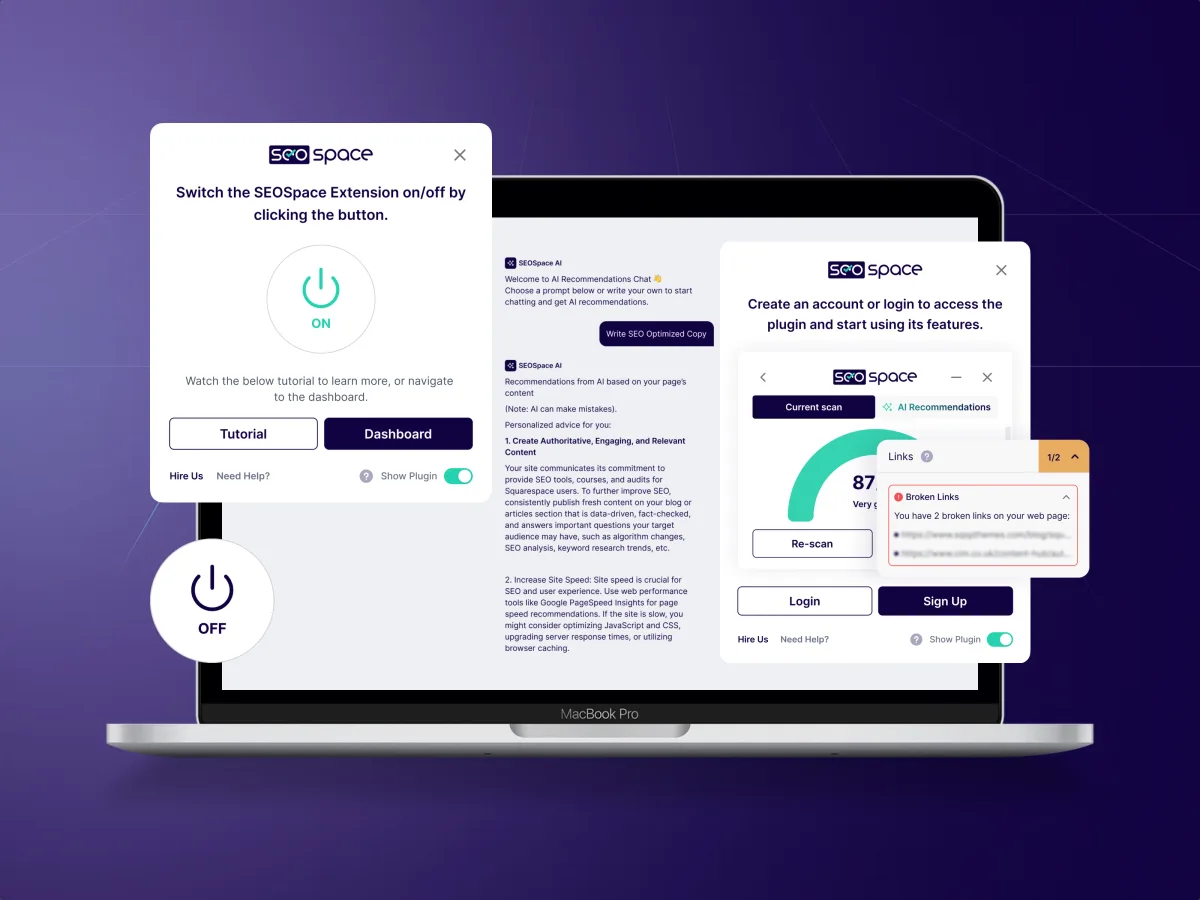
SEO · SaaS · Web platform
Designed an SEO tool for Squarespace — a Chrome extension that scores a live page, a web app for audits, keywords, backlinks and local SEO, and the landing page — on one component set, starting from a UX audit.
It fits when your product finds problems on websites, and its value depends on people actually fixing them.
Users run audits, get long lists and do not know where to start.
SEO specialists and site owners use one product with very different skills.
Advice is needed in the editor or the browser, not only in a dashboard.
Projects, task statuses and reports have to travel beyond the tool.
A different starting point

Tell us who uses the tool and where they give up on a report. We will come back with the service that fits and a realistic next step.
SEO tools are designed one surface at a time — the extension, the app or a single module — through one of our services. Its proposal sets the terms.
Tell us what the product checks, who uses it — specialists, agencies or site owners — and where they get lost.
Message received.
Within 15 minutes, we’ll email you initial feedback and follow-up questions.
Learn how to conduct a UX audit, gather evidence, prioritize usability problems and turn findings into an actionable product roadmap.
Learn how to create information architecture for digital products: content inventory, taxonomy, navigation, card sorting, tree testing and iteration.
Look for one that has designed an SEO product across its surfaces, not only a marketing site for it. Ask how it handled a full SEO suite in a narrow panel, how it scored a page and explained the score, and how the extension and the web app stayed one product. Our SEOSpace case covers all three — SEO extension UX inside the Squarespace editor, a web app for the deep work and the landing page — on one component set.
Lead with the state of the page, then one next step at a time. A score says how the page is doing; findings are grouped and ordered by what to fix first, each written as advice in plain words, with the detail one click away for the specialist. After a fix, a re-check shows the change. In SEOSpace, the extension leads with one score for the page and keeps the advice in drop-downs until they are needed.
SEO specialists who audit and prioritise, agency staff who manage many client sites and report on them, site owners doing their own SEO for the first time, content editors who fix pages, and admins who manage plans and seats. The workflows run from adding a site and crawling it to reading findings, working through tasks, researching and tracking keywords, local and backlink views, re-checking, and client reports.
A UX Audit shows where users stall in the current tool — SEOSpace itself started with one. UI/UX & Product Design takes a new product to handoff, Product Redesign rebuilds a live one, Web App Design covers the tables and projects, and Design Systems keeps the extension, app and site on one component set. MarTech Development builds the result. We design SEO products; we do not run SEO for your site.
With the flows, not after them. Every screen is drawn for a crawl still running, a site that blocks the crawler, hundreds of issues at once, a fix not yet re-checked, a keyword with no data, a ranking drop overnight, a plan limit reached, the extension opened on an unsupported page, and a report shared with a client. Plan limits and client access are set out in a matrix engineering can check the build against.
Access to the app, the extension and staging with test sites and a test account per plan. What the crawler and data sources return, and where they fall short; time with SEO specialists, agency staff and site owners; the questions your support team hears again and again; a product owner who decides; and the engineers who own the crawler and the data.
SEOSpace, built for people who run Squarespace sites — 400+ unique screens by a team of 5 experts, spanning the Chrome extension, the web app and the landing page. The case study shows the audit findings, the extension's scan panel, local SEO and keyword tracking. The crawler and ranking data behind them were SEOSpace's own engineering, not ours.
Yes. SEOSpace started as a UX audit of the product already in use — seven usability reviews, each finding with a recommendation — and the audit steered every phase after it. The work happens in your files and components, reviewed by your product team and engineers, so the extension and the web app keep sharing the same parts.