
The Ultimate Guide to Dashboard Design: Creating Visually Appealing and Functional Dashboards
Learn dashboard design with ANODA UX Agency. Craft functional, stunning dashboards with intuitive layouts, dynamic features, and clear visualizations.
Design the tools quality teams run on — the checklist an inspector completes on the factory floor, the defect they log with one hand, and the report a manager reads at head office in another language.

Quality tools an inspector finishes on the floor, and a manager can trust at head office.
Evidence and audit trails for regulated work.
Manufacturing & Quality Management Design
The inspection itself, on the floor and in the report.
Not included
Four spots where inspection work stalls between the floor and head office, and how the design removes each.
Every inspection task two taps away, sized for gloves, noise and a factory floor.
Photo, severity and order attached on the spot, and routed to the person who acts.
Inspections and planned audits rolled up by supplier, site and order.
Layouts that hold when German or Thai run far longer than English.
You receive
Industrial UI design earns its keep on the floor: a checklist item that fails, a photo with no signal to send it, a supplier who reads the report in another language. Each state gets a screen for the inspector and one for the manager who acts on it.
A quality and compliance app for inspectors, plus a warehouse robotics console: industrial work, though not inspection.
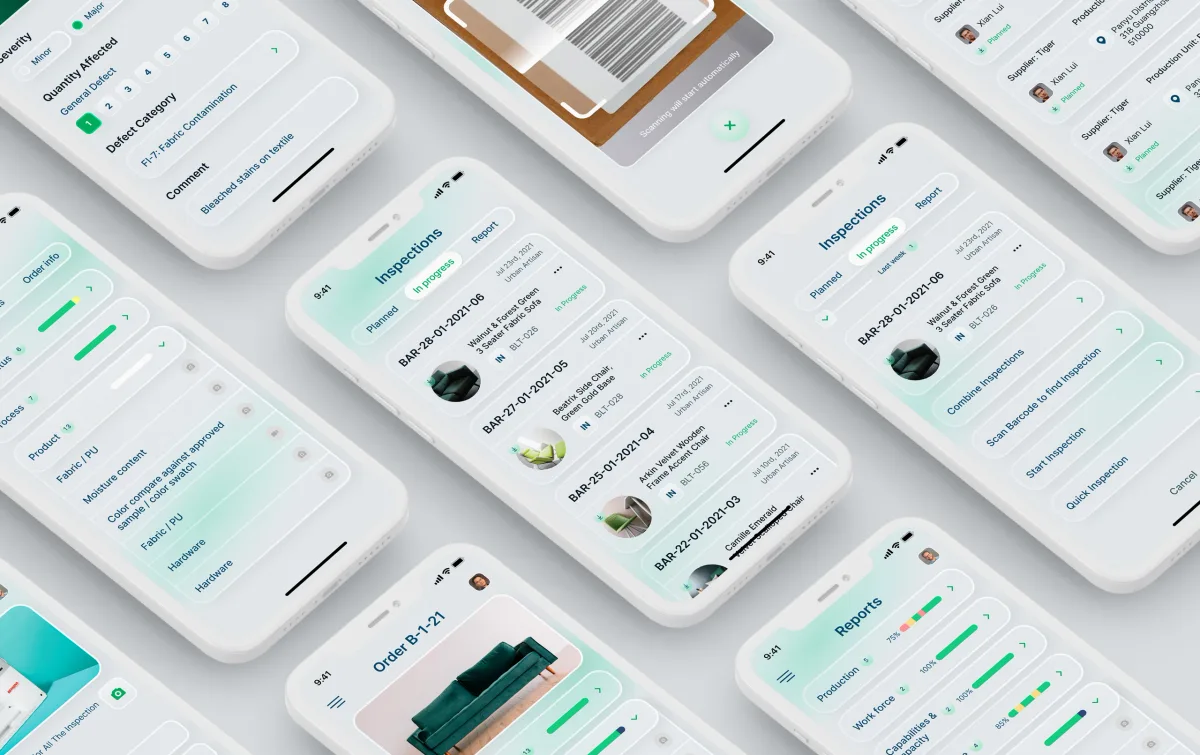
SaaS Product Design · Quality control
Designed a quality and compliance product for brands, retailers and suppliers — checklists and defects on a phone, planning, reports and corrective actions on the web.
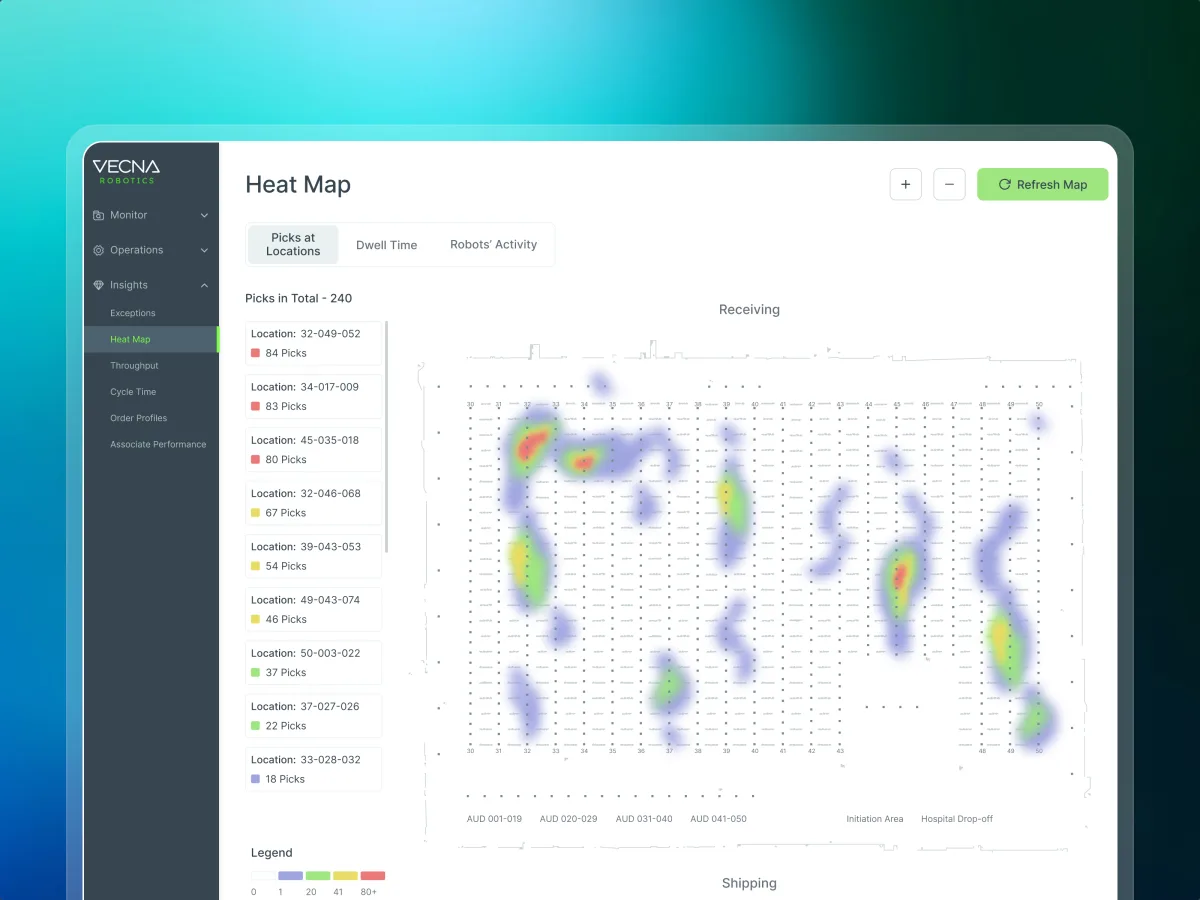
Robotics · Warehouse ops · Web SaaS
Redesigned the console operations managers use to configure robots, watch a warehouse live and handle alerts — industrial operations, not quality inspection.
It fits when quality is checked on a floor and judged in an office. The signs below come from the floor and the quality office alike.
Someone checks goods, lines or suppliers with a phone or tablet in hand.
Brands, suppliers, agencies and sites each see their own part of it.
The same checklist has to read clearly in every market you serve.
Your team can say what passes, what fails and who signs off.
Tell us who inspects, who reviews and where your checklists slow them down. We will name the service we would start with and the inspection flow it targets.
Quality tools are designed one service at a time, with scope and review rhythm in its proposal.
Tell us who inspects, what they check, which languages you ship, and where reports stall.
Message received.
Within 15 minutes, we’ll email you initial feedback and follow-up questions.
Learn dashboard design with ANODA UX Agency. Craft functional, stunning dashboards with intuitive layouts, dynamic features, and clear visualizations.
Ask for work used on a floor, not only clean screens. Good candidates can show how an inspector completes a checklist with one hand, how a defect is logged and routed, how reports read for a manager and a supplier, and how layouts hold in languages that run longer than English. Ask what they left to your quality team as well: design certifies nothing. Our Qarma case shows that work; Vecna Robotics, an industrial operations console, is related but not inspection.
It usually runs from research into your users and competitors and the information architecture, through checklist, defect and report flows with every state, to a clickable prototype, the UI with its design system, and a localisation-ready handoff. More roles, platforms, languages and connected systems raise the cost, as does redesigning a tool inspectors use every shift; generous access lowers it. Those factors become a price and timing in the first proposal.
Inspectors and auditors on the floor, QA and compliance managers at head office, brands, retailers, suppliers and third-party agencies, and the admins who set up checklists and users. The workflows are planning audits, running an inspection, completing checklists, logging a defect with a photo, reviewing and signing off, and reading and sharing reports. Quality inspection app design starts with the inspector's one free hand and ends with the manager's full picture.
Inspector apps on a phone or tablet go through Mobile App Design; audit planning and review in the browser through Web App Design. When managers need inspections and audits on one screen, Dashboard Design. A new product, from research to handoff, fits UI/UX & Product Design, and a product whose main job is evidence and audit trails fits Compliance & RegTech. If inspectors quietly avoid a live tool, begin with a UX Audit.
No design can. What we design is how a standard's checklist is shown, what an inspector must capture before a result is final, who may override or sign off, and what each party can see. Your quality leads own the standards, grading and translations, and ISO, safety and legal sign-off stay with your team and auditors. Machine and MES integration is outside our work, and we do not promise fewer defects or faster lines.
Staging with test orders and suppliers, logins for inspector, manager and supplier, and a product owner able to make calls. Your checklists, grading rules and the languages you ship, plus past reports and the places inspectors fall back to paper. An early talk with engineering puts ERP and supplier constraints on the table before the first screen. A walk through one real inspection, even on video, shows us what the floor asks of the screen.
Qarma, a quality and compliance product for brands, retailers and their suppliers — one app for inspectors on the floor, a web platform for planning, reports and corrective actions, and messaging for teams who work in different languages. Close to it but not inspection: Vecna Robotics, the console warehouse operations teams use to run robots and alerts. We have no other published manufacturing case, and earlier industrial work is not shown as proof.
Yes. Inspectors use quality tools every shift, so changes have to arrive without breaking their routine. We use your existing files and system, work with your designers and engineers, keep the patterns inspectors follow by habit, and hand the files to you. On Qarma, that meant a UI kit and a client file for each release.